














Gamification of Training: From Virtual Cockpit to Real-World Flying

Flight simulators like MSFS and X-Plane can be powerful and structured tools for aviation education.

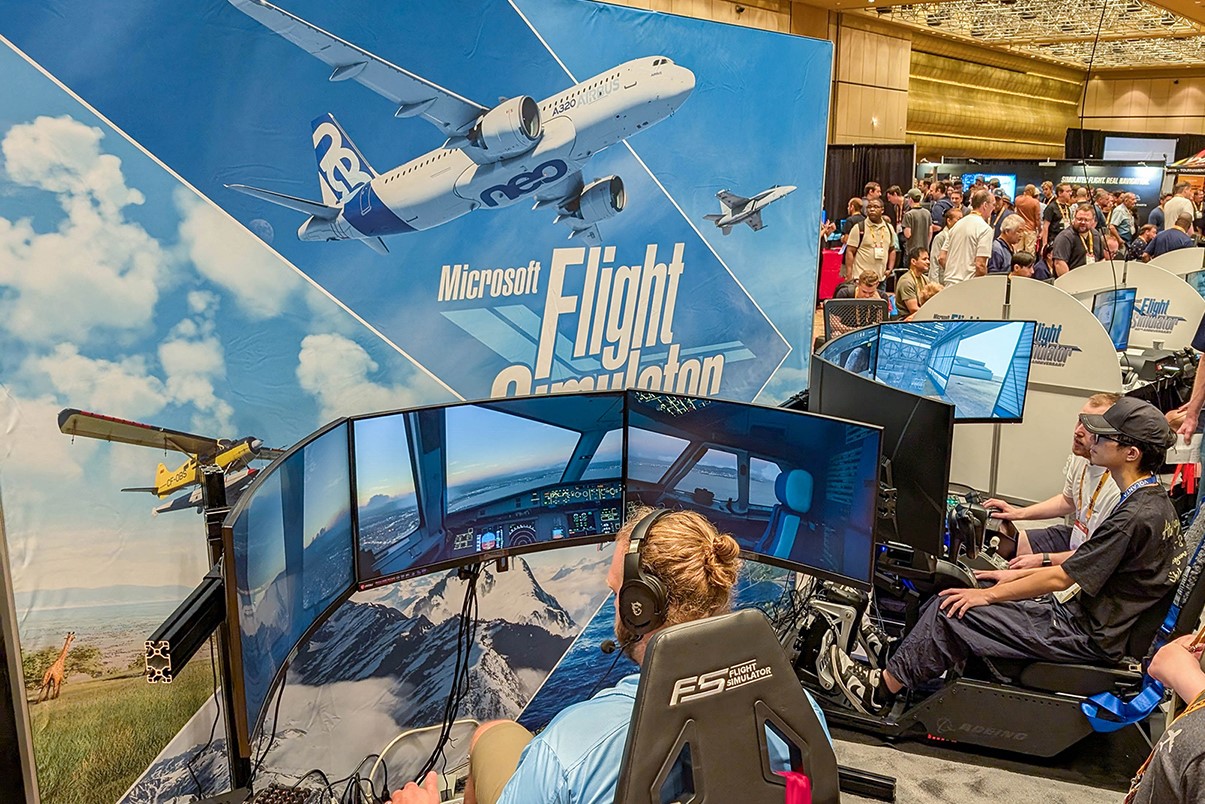
FlightSimExpo attendees at an exhibit in 2024.
FlightSimExpo attendees look over Microsoft Flight Simulator 2024 at last year's conference. [Credit: FlightSimExpo]
Gemini Sparkle

Key Takeaways:

  • Flight simulators like Microsoft Flight Simulator or X-Plane can be beneficial for aspiring pilots if used with a structured approach, appropriate controls, and an understanding of their limitations.
  • Effective simulator practice involves actively repeating real-world flights and syllabus maneuvers, ideally using a virtual aircraft and controls that match the actual training environment.
  • Simulators can help learners apply theoretical knowledge, overcome anxieties about tasks like navigation, and prepare for identifying landmarks and airports in the real world.
  • Dedicated, syllabus-driven homework on a home simulator significantly contributes to a pilot's learning, bridging the gap between virtual and practical flying experiences.
See a mistake? Contact us.

There’s a fledgling aviator out there who will likely be getting an aviation video game this holiday season. Your mother asked me, “Would it help if (insert learner’s name) used Microsoft Flight Simulator or X-Plane?”

I answered yes—as long as this Junior Birdman understands the limitations of it and it has cockpit-appropriate controls for what the learner is flying in the real world and—I cannot believe I am writing this—said JB engages in “structured playtime.” This means repeating the flights you have done with your instructor on the sim or attempting the maneuvers as listed in the syllabus you are using.


For best results use the appropriate checklist and fly a virtual version of the aircraft in which the training is being done.

Sims: Friend or Foe?

I must admit I didn’t really like the gamification of aviation after a 2,000-hour MSFS pilot sort of freaked out on me the first time we took off. It made me wary. Then I met a private pilot candidate who designs video games, specifically aviation games and training scenarios, for a living. He came to me because after years of flying radio-controlled model aircraft and virtual airplanes, he wanted to make the transition to the real thing. 

He was an older learner, married and the father of several children and well established in his career. Older learners tend to have a determination that comes from realizing what a treat and privilege it is to learn something new.

He did come to the first lesson with misconceptions drawn from previous life experience. He thought his first lesson would be spent in the pattern, not unlike that Saturday in the empty church parking lot when you are first learning to drive. He was surprised and pleased to learn we’d be heading to the practice area.

When we applied the syllabus, he began practicing the lessons in advance on his home simulator. 

There were some challenges with the sim, not the least of which was that the virtual airplane was fuel-injected and we were flying in a carburetor-equipped aircraft. The virtual model didn’t come with instructions—the engine kept quitting a few minutes after engine start. 

When he brought this problem to my attention, we had a discussion about the carburetor, carburetor icing, leaning the mixture for taxi, and the use of a fuel pump in certain aircraft models. He applied this knowledge in the virtual world, and the engine stopped quitting.

He also noted that the application of the “pitch, power, trim” process before the clearing turns when setting up for each maneuver that he learned in the real world greatly improved his flying in the virtual world.

Virtual Navigation, Practical Application

One of the most frequently used applications for virtual flight to the real world is navigation. People are afraid of getting lost.

If the video data card is detailed and up to date, it’s easy for the learner to recognize ground checkpoints in the virtual world, such as a major freeway, shoreline, or another airport, to help orient themselves.

This learner was based at Auburn Municipal Airport (S50) in Washington state and, when the lesson called for us to fly to Pierce County Airport-Thun Field (KPLU) 14 miles to the south, there was trepidation—but he’d practiced it at home. Basically, all I had to do was point out landmarks on the ground—the freeway, the valley, and the racetrack where the 45 to downwind is—and assign altitudes that kept us safe and out of the Class Bravo, and he did the rest.

After a few touch-and-goes, we headed back to the north. I warned him that S50 is an airport that a community “grew around,” and sometimes it takes a bit to recognize the runway because it can get lost in the industrial ground clutter. I’ve had a few learners convinced that the airport has a cloaking device because it can be so difficult to spot from the air in flat light. However, after you spot it from the air once, you can usually find it again. There are some airports that you swear have a cloaking device.

It is helpful if the landmarks used to find the airport appear on the VFR sectional or TAC chart, and the preflight briefing includes discussion of this: “There is a freeway on the west side of the airport and a pair of twin water towers on the hill to the west of the freeway.”

The learner also practiced VOR radial interception in his home sim and pattern procedures extensively. There was less going on in the sim than there was in the real world, he noted. When we flew, we monitored the practice area frequency, and he grew used to all the chatter. Flying quiet was a bit of a treat.

His call sign (bestowed after his first solo) is “Puffin,” like the bird. The name was chosen because he had expressed his doubts he could learn to fly—and one of the common misconceptions of the puffin is that the bird cannot fly. This is not true. It can fly, and this learner proved he could as well.

Learning took place, in part because he brought a dedication to the task, and more so because he assigned himself homework using the syllabus and his home simulator.

Meg Godlewski

Meg Godlewski has been an aviation journalist for more than 24 years and a CFI for more than 20 years. If she is not flying or teaching aviation, she is writing about it. Meg is a founding member of the Pilot Proficiency Center at EAA AirVenture and excels at the application of simulation technology to flatten the learning curve. Follow Meg on Twitter @2Lewski.

Ready to Sell Your Aircraft?

List your airplane on AircraftForSale.com and reach qualified buyers.

List Your Aircraft
AircraftForSale Logo | FLYING Logo
Pilot in aircraft
Sign-up for newsletters & special offers!

Get the latest stories & special offers delivered directly to your inbox.

SUBSCRIBE