













Options: Good/Bad News

The good news is that our electronics give us options. The bad news is that it’s not always obvious which is the best option to use.

Gemini Sparkle

Key Takeaways:

  • Modern aviation presents pilots with three key display choices: moving map orientation (north-up vs. track-up), EFIS roll pointers (fixed vs. sky), and flight director types (cross-pointer vs. inverted-V).
  • Pilot preferences for these displays are heavily influenced by early exposure (Law of Primacy), but a contextual approach (e.g., using both north-up and track-up for maps) often proves most effective.
  • Differences in roll pointer and flight director designs can lead to confusion or negative learning transfer if pilots are not adequately trained or accustomed to specific configurations, as evidenced by accident reports.
  • Adapting to varied display options through experimentation and practice (Laws of Readiness and Exercise) is crucial for pilot proficiency and safe operations, especially when transitioning between different aircraft or roles.
See a mistake? Contact us.

With the advent of GPS, moving maps, tablets with aviation apps, and glass panels driven by software, we now have more choices. Having choices in three displays typically results in heated debates among pilots in FBO lounges and hangars, and especially out in the blogosphere. Those, um, “discussions” focus on three display options.

Our moving maps give us the option to display the map with north up or with track up. (There is a third option: Heading-up, which we will not consider; we are more concerned about the course over the ground, i.e., the “track.” Plus, heading up is similar enough to track up that most of the same arguments apply.)


EFIS roll pointers on our attitude indicators give us the option between having a ground-pointer (or fixed pointer) and a sky pointer.

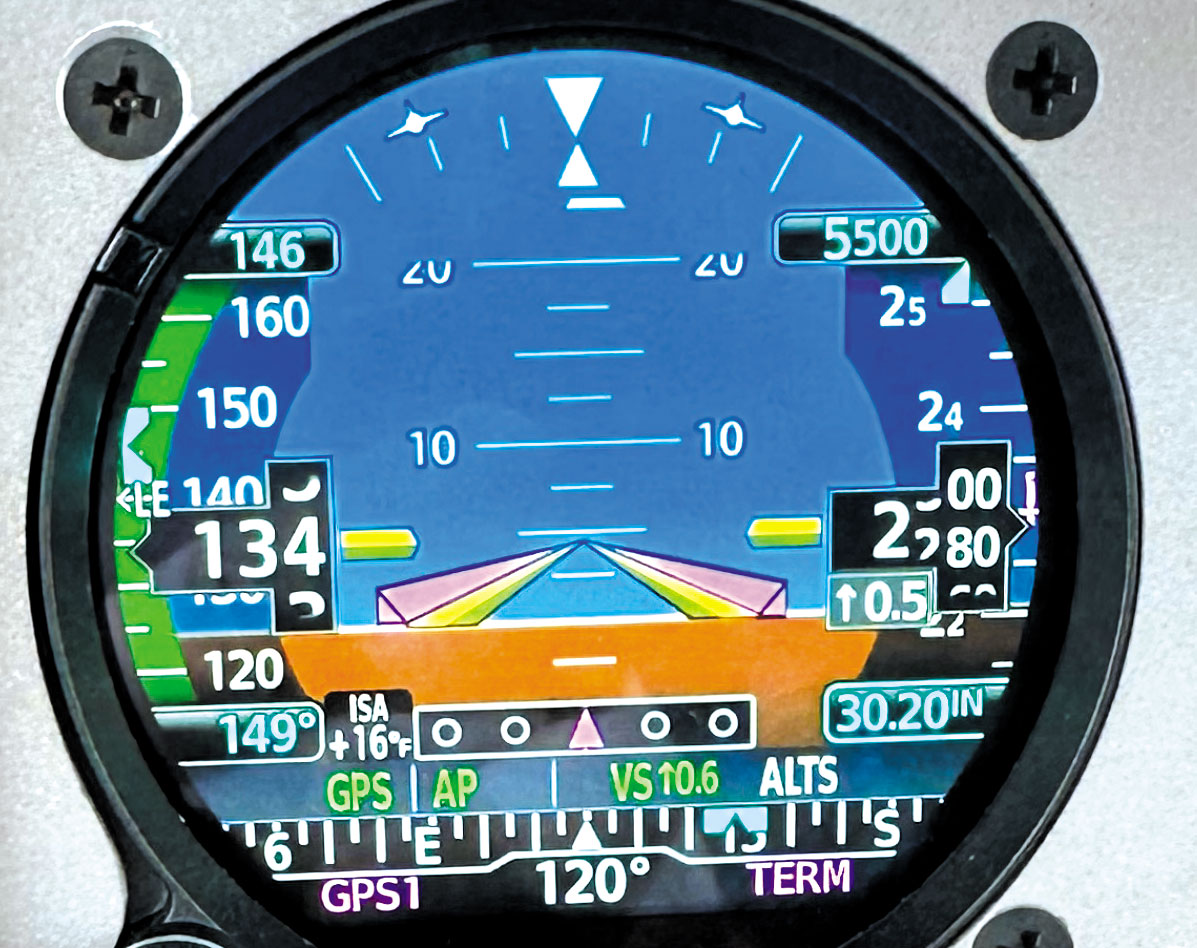
Many modern EFIS offer the choice of flight director between using a cross-pointer or an inverted-V, also called dual-cue vs. single-cue.

As CFIs, we all had to go through a Knowledge Test called Fundamentals of Instruction, colloquially called “FOI.” The FOI curriculum covers six laws of learning; three apply to our discussion:

Law of Primacy—Early exposure has a lasting impact.

Law of Exercise—Repetition and practice increase skills.

Law of Readiness—Willingness to experiment and try new things may open other options.

North-Up vs. Track-Up

In the words of an ancient mariner: “In the good old days of tall ships, while on the high seas with sails full of wind, we had paper charts. And by golly, they were north-up. None of this track-up business. Good back then, still good now, just like fine grog.” (Law of Primacy). North-up was the standard for paper road maps we picked up at gasoline stations and paper sectional charts that we used to chart our cross-country flights with the help of pencil and plotter. 

My colleague, Douglas Boyd, Ph.D., wrote a great article in the November 2022 IFR Magazine, “Which Way is Up?” on this topic. This is perhaps the easiest of the three discussion areas because most, if not all, moving maps have the choice between north-up and track-up, meaning that we, as pilots, can experiment easily between the two displays. (Law of Readiness)

Some pilots prefer one or the other and are adamant about their choice. And that’s fine. Given the context, I have a more nuanced perspective: it is not an either/or situation but both. 

We primarily use GPS for aircraft navigation, a to-to navigation system, and I’m interested in the following two waypoints. Reaching the next waypoint, will I turn left or right or keep more or less the same heading? For me, that calls for a track-up view, just like driving a car: forward-ahead. 

Also, traffic and weather are best observed relative to the nose of the aircraft. (I’m not suggesting using satellite weather for tactical weather avoidance but for strategic purposes.) Visualizing where traffic and weather are—left or right of the aircraft’s nose is more challenging with north-up, especially with southerly headings.

However, there are three situations where I prefer north-up. For planning purposes, it is best to look at the weather for a region using north-up, for example, the U.S. southeast. For a 500 NM cross-country flight in a Mooney (165 KTS TAS), I like to see what the routing looks like and verify that the waypoints were correctly entered into the flight plan.

There is a third possibility, perhaps more for instrument training or proficiency purposes. Holding patterns are typically referenced to the north; for example, hold southeast at the X waypoint/fix. Suppose the hold is not in the database, or the navigator is unable to create it; both north-up and track-up will tell us we are flying directly to the holding waypoint. But with north-up, I can mentally superimpose the holding pattern on the map, and the entry is obvious. Not so with track-up. Try identifying the entry procedure for a holding pattern not shown on the map. Of course, when in the holding pattern with track-up, it gets confusing.

Most panel-mounted moving-map displays allow pilots to change the map from track-up to north-up automatically. Given the modest speeds I fly, I prefer to automatically change the map from track-up to north-up above the 40 NM range, and that selection also applies to the dedicated weather display. However, slower or faster aircraft might have a different range trigger point. 

Geo-referenced approach charts not superimposed on a map, by design, are north up.

So, my bottom line is that track-up or north-up need not be an either-or decision, but is best a contextual decision that requires a willingness to experiment (Law of Readiness). 

Roll Pointer Options

A fixed pointer is perpendicular to the aircraft symbol and a sky pointer is perpendicular to the horizon. (I don’t see how a ground pointer “points to the ground,” so I prefer to call it a fixed pointer.) Typically, the standard for light GA aircraft is the fixed pointer; for most airliners and the military, the standard tends to be the sky pointer. While it might appear to be a minor difference, switching from one to the other isn’t apparent, especially if it is unexpected and could be confusing. Any pilot heading to the airlines might first encounter the sky pointer in a Level D Simulator.

There was a fatal jet crash that the NTSB attributed, in part, to the configuration of the roll pointer. (See sidebar below.)

There is a concept in economics called “putty-clay.” Initially, we had lots of flexibility in an investment (it’s malleable, like putty). Still, once made, we are “stuck” with it, just like clay after the putty is fired in an oven. In the days of mechanical instruments, we had a choice: do we want a fixed or sky pointer? Once made, we are stuck with the decision unless we buy a new mechanical instrument.

With glass, we have putty-putty, meaning that we can switch pointer orientation in a PFD, usually requiring a quick trip to the avionics shop. Garmin Pilot (synthetic vision, but not ForeFlight) allows us to change the pointer orientation. Both Laws of Primacy and Exercise would apply here, and perhaps also Readiness. 

The one reason that perhaps a sky-pointer is better is when an airplane is inverted, and the sky-pointer indicates which way to roll to the nearest upright horizon. A technique to recover from an inverted position is “stick” forward and roll left or right, as indicated by the sky-pointer. However, this might not be a relevant feature to light, non-aerobatic GA airplanes.

While Garmin Pilot allows for toggling between the two roll pointer options, changing the display on Garmin PFDs requires a trip to the avionics shop.

Flight Director Options

Flight directors (FD) are usually part of an autopilot (AP), so it is natural to think that they are the same, but they aren’t. While rare, one could have a flight director without an autopilot. Think of the flight director as the “brains” and the autopilot as the “muscle,” since the AP follows the instructions from the flight director. This implies that one can fly with the flight director on but with the autopilot off, with the idea that the carbon-based pilot provides the muscle on the controls. 

But beware: If hand flying to follow a flight director (with AP off), the pilot must enter the same inputs (modes and parameters) into the autopilot control head as if the autopilot were engaged. In most autopilots with a flight director, turning on the autopilot also turns on the flight director. However, when turning off the autopilot, the flight director usually stays on, requiring another button push.

Flight directors are displayed on the attitude indicator (AI) on both mechanical and glass AIs. There are two types of displays: cross-pointer (also called dual-cue, split-cue, or cross-hair) and inverted-V. The original FD is the cross-pointer, and it looks very similar to the conventional round gauge VLOC/GS nav head with separate left-right and up-down indications, except that the FD is mounted on the top of the attitude indicator. 

The inverted-V display was developed later by Collins Radio since it was felt to be more intuitive. Most light GA aircraft use the inverted-V display, giving us limited exposure to the cross-pointer, and possibly many hours flying behind both mechanical and glass inverted-V displays. However, with a recent software upgrade, the FD display type is now pilot-selectable on some Garmin PFDs. Previously, an avionics shop had to make the change.

As mentioned, the cross-pointer FD looks similar to the traditional nav head but works differently. For example, when the vertical command bar moves, say to the left, it means roll the aircraft to the left. Once the aircraft is turning left, the command bar centers. To return to straight and level, the command bar moves right, telling us to start a roll to the right to return to level flight. The objective is always keeping the FD needles as an unbiased “cross,” unless transitioning to another state or following a change in course. 

Compare that to, say, a VOR needle. When the VOR needle is deflected, it stays deflected until the start of course interception and eventually centers, and heading changes will also be required. This means that when the aircraft is established on a course, both cross-pointer FD needles and VLOC/GS or GPS/GP look the same: unbiased cross. In an inverted-V FD, the aircraft is maneuvered so that the little triangle (the aircraft symbol) is always “nested” in the inverted-V.

Typically, though when an FD is displayed, it usually is a result of the A/P being engaged; therefore, it does not really matter which display is shown. However, when flying an approach manually, some pilots prefer to use the FD, and some don’t. Of course, when manually following the FD, the type of display matters. It’s difficult to make an argument that one FD display is better than the other; this mostly boils down to personal preference.

For pilots contemplating going to the airlines, it might be advisable to have some experience flying with sky-pointers and cross-pointers. (Law of Readiness)

While the retrofit equipment like Garmin’s G500 TXi and the GI 275 can give you multiple pilot-selectable and install-selected options, on integrated glass panels like the Garmin G1000, changing displays may not be possible because the glass panel is part of the aircraft-type certificate data sheet, which is “owned” by the aircraft manufacturer. 

Discussions of these various options can be lively. If you have a solid point to make, we want to hear about it. Contact the editor at Frank@IFR-Magazine.com


Luca F. Bencini-Tibo, a CFII in South Florida, finds it a bit challenging (for now) to fly manually with a cross-pointer FD, but with some practice, he is slowly finding it more intuitive. However, given the inability to conveniently toggle between roll pointer options, he is not sure what it would be like to fly with a sky pointer.

Ready to Sell Your Aircraft?

List your airplane on AircraftForSale.com and reach qualified buyers.

List Your Aircraft
AircraftForSale Logo | FLYING Logo
Pilot in aircraft
Sign-up for newsletters & special offers!

Get the latest stories & special offers delivered directly to your inbox.

SUBSCRIBE