











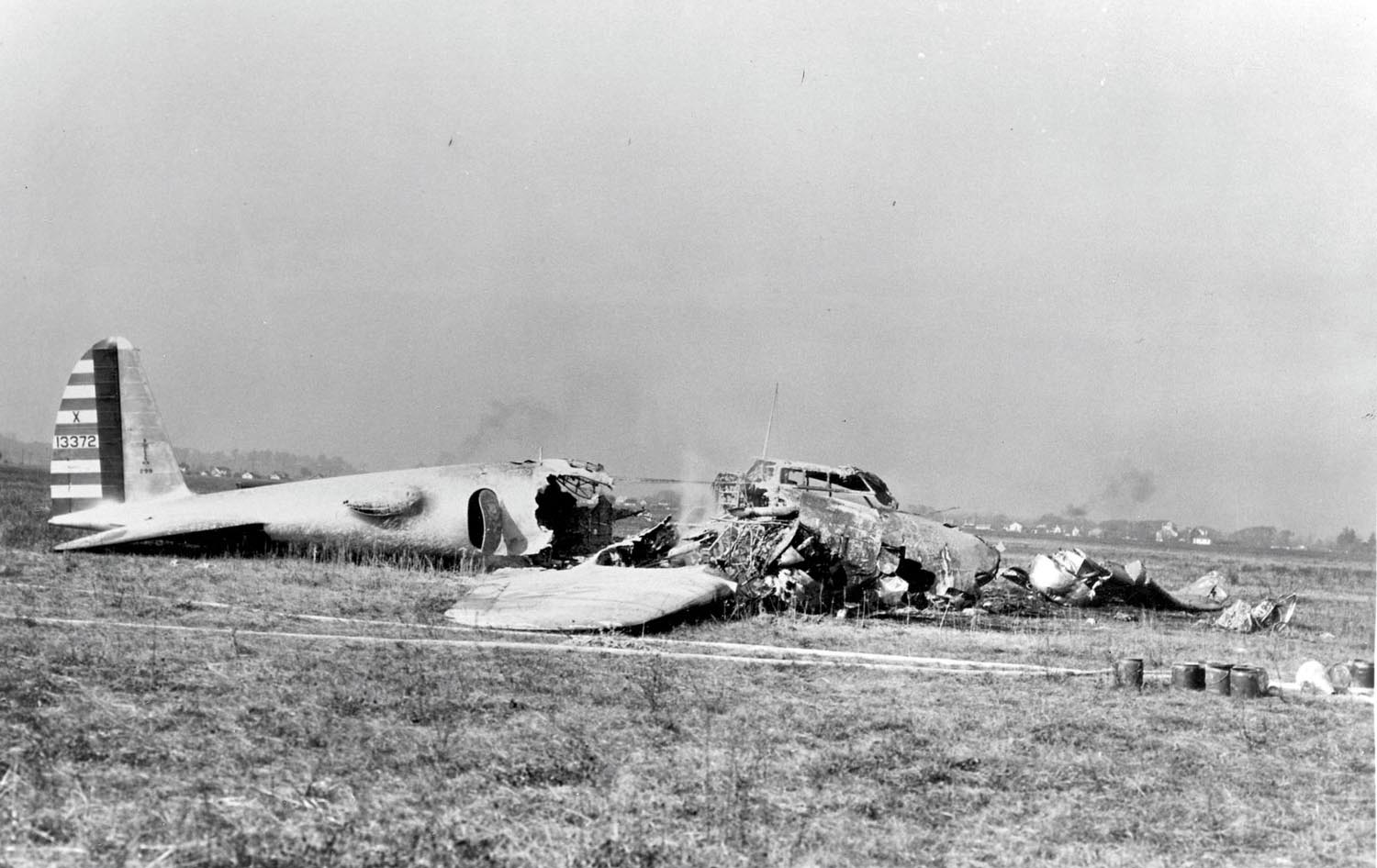


On October 30, 1935, a Boeing 299, a prototype of the B-17 Flying Fortress, departed Wright Airfield in Ohio and immediately entered a steep climb. The aircraft stalled and crashed, killing two pilots of the five men aboard.
Investigation revealed that the pilots failed to unlock the aircraft’s rudder and elevator gust locks. Boeing investigators realized that aircraft had become too complex to manage by memory. This insight led them to create the first preflight checklist, which led to the comprehensive checklists of today.

Imperfect
A series of air carrier accidents in the late 1980s demonstrated that improper, non-use, or poor checklist design could contribute to an aircraft accident—the exact opposite of its purpose. NTSB records are rife with incidents or accidents that following a checklist would have prevented or mitigated.
NASA published two research studies on the subject in 1990 and 1992. This article incorporates pertinent human factors from these studies and pilot suggestions to help you build a safe, workable checklist.
Functional Objective
NASA defines the major function of the checklist as ensuring the pilot will properly configure the aircraft for flight and maintain this level of quality throughout the flight and every flight. The FAA’s Airplane Flying Handbook says the checklist is a memory aid and helps to ensure that critical items necessary for the safe operation of aircraft are not overlooked or forgotten. Some consider the checklist more than a memory aid but a task by itself, an interface between humans and machines.
Critical flight segments include Takeoff, Approach, and Landing: “the first three minutes and the last eight.” While small compared to average flight duration, they account for about three-quarters of hull-loss accidents.
Checklist Objectives
Checklists help the pilot configure an airplane during each phase of flight, including emergencies. Each provides a logically organized sequence to verify aircraft configuration and offset any reduction in the pilot’s psychological and physical condition, e.g., being tired, hungry, or dehydrated.
A well-designed checklist provides a convenient flow for head and hand movements and eye fixations along the cockpit panels.
Do-Read or Read-Do?
Many GA pilots find the Do-Read or Do-Confirm sequence best for them. Using a memorized flow pattern, the pilot configures the airplane for each flight phase. Then, the checklist confirms that critical items have been correctly set. The Do-Read sequence’s main virtue is speed.
Read-Do guides the pilot step-by-step through each checklist: read, touch, recite aloud. There is no need to memorize, and it is probably preferred when flying an unfamiliar airplane. The main drawback of do-lists is that they are detailed and time-consuming.
If you fly more than three segments daily, NASA suggests the Do-Read method and a less-detailed checklist. If you fly less, you may choose a more detailed checklist. If only you fly the airplane, a shorter checklist could be sufficient. If others, especially students, fly it, the detail level must be more inclusive.
Are Checklists Required?
The regs say we must have checklists accessible at our pilot station (§91.503) but there is nothing stating we must use them. Failure to do so could constitute a “Careless or Reckless Operation” under §91.13. The ACS says on an IFR flight test, “Throughout the practical test, the applicant is evaluated on the use of an appropriate checklist.” Many examiners opine that applicants often read but don’t do the item written. The accident record frequently confirms an absence of checklist discipline.
Can I Modify a Checklist?
In a 2011 statement, FAA Flight Standards Service wrote, “For Part 91 operators that are not operating under Subpart K, there is no FAA requirement for acceptance or approval of modified checklists.” Indeed, the FAA recommends developing your own checklist as long as it includes all POH and STC checklist elements.
Supplemental Checklists
More recently, the FAA published a YouTube video, “Supplemental Checklists for Aftermarket Safety Equipment in 57 Seconds,” in which a FSDO manager noted, “Creating your own checklist under 14 CFR Part 91 is allowed.”
Many factory-built aircraft come with extra equipment. Those supplements are described in Section 9 of the POH. For instance, many Cessna 172S aircraft were delivered with factory-installed KLN-94 GPS units. In those aircraft, Supplement 19 includes Limitations in Section 2. One requires the KLN 94 Pilot’s Guide to be available to the flight crew whenever IFR navigation is used, and the manual version must match the unit installed. Another requires performing the self-test, and a third requires the pilot to verify the database for IFR or verify each waypoint by reference to approved data.
Accordingly, for every piece of optional or aftermarket equipment you add, look for any checklist items and add them in logical order.
SAFO 17006
Safety Alert for Operators 17006 discusses the risks of using something other than the POH/AFM checklist. A pilot used a commercial off-the-shelf (COTS) checklist for a specific aircraft that suffered a partial gear extension. On landing, the gear collapsed, and the aircraft was substantially damaged.
The COTS checklist was found to have omitted the manufacturer’s checklist relating to landing gear failure and manual extension and a relevant CAUTION statement. Had the pilot had this information, the accident might have been prevented.
The SAFO recommends that pilots and operators “that choose to use COTS or personally developed checklists should meticulously compare them to the manufacturer’s checklist and placards contained in the POH/AFM to confirm they are consistent.”
Have a knowledgeable person, such as a CFI, review your homegrown checklist to ensure it’s correct. Test “fly” it in the cockpit for completeness and efficiency. Does it run you all over the cockpit, or does it flow naturally?
Use Your Checklist
Common excuses for not using a checklist include aircraft familiarity, inconvenience, or workload. One common excuse is, “Checklists are simple and straightforward, so what is there to study about them?” This misses the point. Besides being a memory guide, a checklist generates and coordinates many cockpit tasks. Failing to use the checklist is a mistake, but how likely are you to not use a checklist you created?
The process of building your own checklist can be more valuable than the checklist itself. The FAA observes that “pilots find the process forces them into a deeper understanding of the aircraft and its safety features and makes them safer pilots.” One pilot who has written half a dozen checklists suggests you begin by reading your entire POH/AFM. You’ll be amazed by how much you’ll learn, some of which might be worthy checklist material.
Writing out the emergency checklist is very helpful in pre-thinking what motions and actions are necessary for the event. Since emergency checklists are rarely needed, reviewing them before departure is wise.
Don’t rely on checklists to initiate changes in aircraft configuration. Use them for specific operations, such as takeoff or landing.
Checklist design philosophy varies between manufacturers, regulatory agencies, and operators. Anticipate that a checklist for one airplane model might differ from that for another airplane of the same model but perhaps in a different year.
Checklist Length
Finding the right level of detail affects the length of the checklist. Shorter is generally better, and the obvious can go unstated.
One extreme view says that most configuration items must appear in the checklist. Others contend that only the most essential items need to be presented. How do you know if an item is vital enough to be included?
Many pilots believe the ones you might forget should get top billing. Most pilots don’t need a checklist to tell them to buckle up. Do you need a checklist to turn on the NAV lights? At a tower airport do you need “TAXI CLEARANCE…. OBTAIN”? “Lights, camera, action” might suffice on the runway, but you might want a takeoff checklist item for “Time Off” on departure.
Ordering Checklist Items
Every checklist should include a before-takeoff checklist that ends with “Before takeoff checklist complete. Lights, camera, action to go.”
On landing, the before-landing checklist should be reduced to the final items just before leaving cruise altitude because they are distracting. Final items include gear, props, and flaps set for landing.
Short-term memory is limited and deteriorates with age. It is one of the greatest constraints on human performance. Tasks such as long checklists place unrealistic demands on short-term memory.
One solution is chunking. You can chunk (group) information into defined units regardless of length. You create a chunk when two or more items share a common factor that glues these items together in your memory.
For instance, you can chunk by system, such as pressurization, hydraulic, and electrical systems, and separate chunks graphically using spaces or indents on a checklist card. Chunking reduces the short-term memory required to perform even a long checklist. Research suggests the maximum desirable chunk size is seven plus or minus two in working memory.
Critical tasks should be completed early in the checklist order because the likelihood of forgetting increases as the checklist progresses. Duplication of “killer items,” such as flaps, serves as a double-check that the task has been done. Every checklist should have a defined endpoint and positive confirmation. “Checklist complete” or a STOP symbol serves this purpose.
Phraseology
Limit vocabulary size in favor of frequently used words. Avoid ambiguous responses such as “set, checked, completed” because they can be recited easily without verification. Better to respond with what you see: “Altimeter 30.10” is better than “checked” or “set.”
Typography
Font size is important, especially for older pilots. Around age 50, there is a 50 percent reduction in retinal illumination compared to a 20-year-old.
Use sans-serif fonts such as Arial or Helvetica. Characters should be 13-16 points minimum and 18-28 points maximum. Fonts below 13 points are not recommended. Use enough line spacing in paper checklists to prevent accidentally slipping to the following line. Uppercase is fine for titles, acronyms, or emphasis, but lowercase checklist items are more readable.
Modifying your Checklist
Retain all POH headings, usually shown in bold or capital letters. Beneath them, you can reorder, add, or remove irrelevant items. If there is white space between an item to check and its desired value, use dots to connect them. Omit CYA, useless items, or items no longer considered sound practice. Add essential things such as your EFB or ADS-B In unit and AOA indicator.
Electronic Checklists
Experiments show that a computer-aided procedure is superior to a paper list and reduces both error rate and execution time. You can pull up a checklist without holding it; lighting is not a problem. Checklists can be marked complete as noted by a change in color or removal from the list. The estimated error probability per item for a checklist with no checkoff provision is one in one hundred. With a checkoff provision, it decreases to three in a thousand.
Disadvantages include a fixed distance from the eye. Vision becomes more of a problem as the pilot’s visual acuity decreases with age. Some displays are difficult to read or modify. Fewer and shorter lines can fit on an electronic page than on a paper checklist, often necessitating paging.
Apps abound. One we particularly like is MiraCheck Copilot (now called Goose), discussed in our December 2017 article, “The Checklist We Want.”
Manage Interruptions
Pilots traditionally use a thumb to mark a paper checklist interruption, but this can be problematic. If it slips, then what? One recommendation is to go back three steps and continue. Most checklists have insufficient line spacing to precisely identify the location of the thumb to a particular line. Only the leftmost column can be noted if there are two columns.
Some abnormal and emergency procedures should be memorized and become part of your procedural memory as motor skills. Procedural memory is less affected by stress than other forms of memory retrieval. Pilots should practice emergency procedures regularly to help form correct habits. When time permits, use the checklist to confirm that all steps were performed as required.
Decoupling
Checklists are often tightly coupled in time to tasks such as starting the engine(s), landing, and takeoff. Sometimes, coupling is deliberate, such as completing the takeoff checklist on the runway or just before taking the runway. However, tighter coupling reduces the ability to recover from a failure.
Experts believe critical checks should be completed sooner in the ground phase to decouple critical items from the takeoff segment, giving the pilot more time to correct a misconfiguration. Consider using checklists when you are not busy and evaluate the likely outcome of delaying a checklist.
Paper Formats
An Internet search reveals many paper checklist options. Pilots create eye-friendly checklists using Google Sheets, Slides, Docs, Excel, PowerPoint, Word Booklet, or custom templates. Consider using iGauge weatherproof “paper” from weatherproofpaper.com. It’s a porous synthetic film compatible with inkjet and laser printers. Franklin-Covey sells a nice Jeppesen-style steel punch. Checklists can be spiral bound with clear inserts or used in half-page or trifold format on a kneeboard. Normal checklists go on one side, emergencies on the other.
One novel takeoff and landing checklist consists of eight toggle switches. From left to right, the switch is turned up for each item completed for takeoff and down for the landing checklist. No external wiring is required. See buddycheckbox.com for details. Alternatively, use your audio panel.
Final Thoughts
Your checklist is a living document that evolves as you use it and your panel changes. You may want to add a note, “Not the POH checklist but includes all items.” to reassure an inquisitive examiner or ramp checker.
As a new pilot, the author took a lady friend for a ride. As he methodically followed the checklist, she became more nervous by the minute. Finally, she asked, “You do have a license, don’t you?” “Yes, of course.” “Then why do you need the directions?”
Fred Simonds, CFII, is a longtime pilot who still reads the “directions” every time.