











WX24Pilot App Offers Simplified Weather Analysis
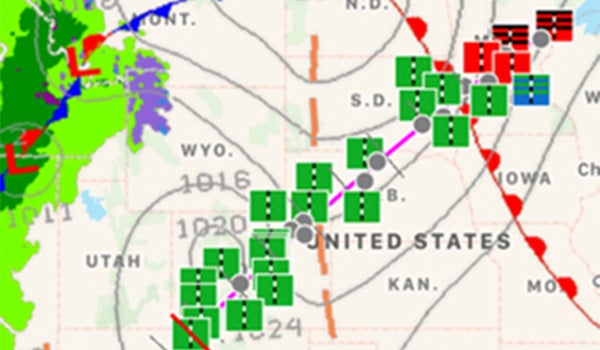
The WX24Pilot iOS app’s visual presentation of a variety of weather data sources may be a practical solution to the weather data dump many pilots subject themselves to before takeoff. WX24Pilot
Gemini Sparkle

Key Takeaways:

  • Pilots often struggle to interpret the vast amount of raw weather data, leading to a lack of context during pre-flight analysis.
  • The WX24Pilot iOS app offers a visual solution by graphically blending various weather sources (Metars, TAFs, winds aloft, PIREPs, prog charts) to simplify analysis and demonstrate expected changes over time.
  • The app includes practical features such as visually presenting IFR alternate requirements, highlighting significant weather for VFR pilots, and allowing users to adjust flight routes to find better conditions.
  • Its creator warns that users must be willing to invest time learning the app's extensive features to fully utilize its many useful elements.
See a mistake? Contact us.

One hurdle for many pilots, especially those flying IFR, is interpreting the hundreds of Metars, TAFs, Sigmets, Airmets, prog charts and other weather data sources available online today. All too often, pilots choose to simply check destination weather, winds aloft and perhaps a few Metars along the route. Downloading more data is not a solution, however. What’s missing really is context to understand the data being presented.

Paxton Calvanese told Flying yesterday at Sun ‘n Fun he believes his WX24Pilot iOS app’s visual presentation of a variety of weather data sources is a practical solution to the weather data dump many pilots subject themselves to before takeoff. The app, available for smart phones and tablets, blends hourly weather reports and forecasts with winds aloft, PIREPs and prog charts into a graphical display that simplifies weather analysis. With the touch of a finger, the app’s display offers several visual options to demonstrate weather changes expected with the passage of time.

For IFR pilots the app can visually present the need for an IFR alternate, just in case the pilot’s a bit rusty on the 1, 2, 3 alternate rule. There’s also a personal minimum section perfect for VFR aviators that makes areas of significant weather along a flight planned route stand out. Don’t like what you see? Pilots can use a finger to pull the route line one way or the other to find better weather. The app offers many more tools, all available by either touching an icon or double-tapping the screen.

The app comes with a word of warning from its creator. Calvanese believes there are so many useful elements to WX24Pilot that he created easily downloadable tutorials. He says if users aren’t willing to spend at least their age in minutes learning how to use WX24Pilot, they really shouldn’t waste their time downloading the app.

WX24Pilot is available at the Apple App Store.

Rob Mark

Rob Mark is an award-winning journalist, business jet pilot, flight instructor, and blogger.

Ready to Sell Your Aircraft?

List your airplane on AircraftForSale.com and reach qualified buyers.

List Your Aircraft
AircraftForSale Logo | FLYING Logo
Pilot in aircraft
Sign-up for newsletters & special offers!

Get the latest stories & special offers delivered directly to your inbox.

SUBSCRIBE