













Register

Build Your Own Sim, Pt. 4

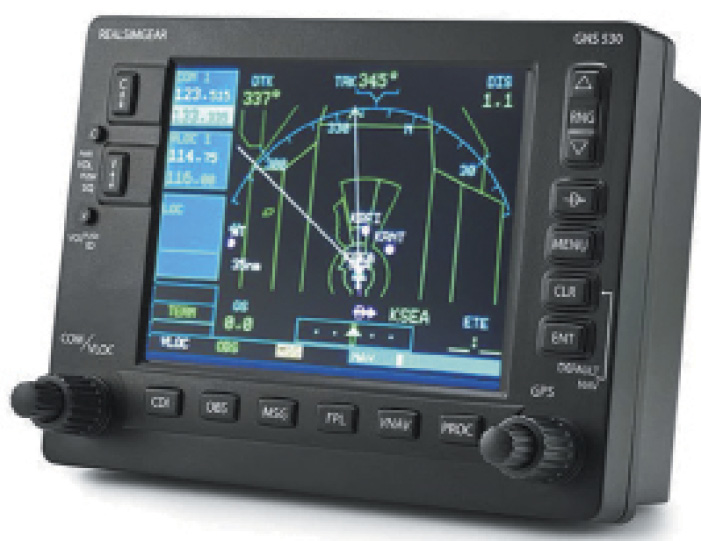
On-screen images of avionics can be replaced with more realistic actual bezels like this from RealSimGear.
Gemini Sparkle

Key Takeaways:

  • Flight simulators like X-Plane require third-party add-ons to become truly effective training platforms, making it crucial to select enhancements based on specific mission goals.
  • Key customization areas include replicating real-world instrument panels (e.g., with Sim Innovations Air Manager) and avionics like Garmin GNS/GTN or G1000 systems using software plugins (e.g., RealityXP, Navigraph) or dedicated hardware (e.g., RealSimGear).
  • Enhancing weather realism and scenery detail is also vital, with options ranging from X-Plane's built-in features and new engine improvements to extensive free and payware solutions for photorealistic landscapes and accurate airport environments.
See a mistake? Contact us.

You can think of your sim like a desktop operating system: By itself, it’s not extremely useful; only when you install third-party applications on top of it are you truly enabled to do real work. Same is true for X-Plane.

The fact is most simulators rely on a vast array of third-party add-ons to provide a more immersive flying experience. But navigating this ecosystem is not only a daunting task in itself, but also risks falling down a rabbit hole that can (read: will) waste both your time and money. Again, repeat after me, think of the mission.


Alexander Sack

Alexander Sack is a Commercial IFR pilot out of N90. And despite the record-breaking summer heat he has been enjoying, nothing makes him sweat more than a good-old fashioned, text-only ODP.

Ready to Sell Your Aircraft?

List your airplane on AircraftForSale.com and reach qualified buyers.

List Your Aircraft
AircraftForSale Logo | FLYING Logo
Pilot in aircraft
Sign-up for newsletters & special offers!

Get the latest stories & special offers delivered directly to your inbox.

SUBSCRIBE