







PC flight simulators are a popular way for aviation enthusiasts to get into flying without the expensive alternative of flight simulators or flying lessons. When putting together an at home PC simulator choosing the right hands-on-throttle-and-stick (HOTAS) flight control peripheral is important.
Here is FLYING’s guide to a few of the best HOTAS flight stick on the market.
Quick Look: Best HOTAS Flight Stick
- Best for beginners: Thrustmaster T.16000M
- Best premium HOTAS: Thrustmaster Hotas Warthog
- Best midrange HOTAS: Logitech X56
- Best for realism: HORI Ace Combat 7
- Best simple option: FR-Tec Raptor Mach 2
5 Great HOTAS Flight Sticks
Below are FLYING’s choices for at-home hands-on throttle-and-stick (HOTAS) flight control peripherals.
Thrustmaster T.16000M

The Thrustmaster T.16000M HOTAS is a great option for first-time HOTAS buyers. The Thrustmaster T.16000M gives users more precision, flexibility, and customization than standard computer gear can provide. This HOTAS flight stick comes with ambidextrous controls to fit any PC gamer.
Compatibility: Windows and Vista
Connectivity: USB
Mountable?: Yes, suction mount
Programmable buttons?: Tailor your own profiles to enhance most Thrustmaster flight controllers with Thrustmaster advanced programming graphical editor software.
Weight: 3 pounds
Special features:
- Ambidextrous stick grip
- Four-axis flight control
- 16 action buttons with braille-style physical button identification
X-Plane has been aviation’s most realistic flight simulator for the past decade, with incredibly life-like scenery, detailed cockpits, and realistic aerodynamic modeling. The latest version is a major upgrade, with an update to aerodynamic physics in the digital world as well as a complete overhaul to the weather engine.
Download NowThrustmaster Hotas Warthog

The Thrustmaster Hotas Warthog is a premium replica of the Air Forces’ A-10C attack aircraft. The dual throttle system offers precision and fully functional programmable controls. The HOTAS Warthog utilizes the TARGET software suite allowing users to test, configure and program Thrustmaster controllers. This HOTAS is perfect for experienced users who don’t mind the premium price.
Compatibility: Windows
Connectivity: USB
Mountable?: Yes, screw mounts
Programmable buttons?: 55 fully programmable action buttons and 2 four-direction hat switches.
Weight: 13.23 pounds
Special features:
- Twin throttle controls
- Licensed by the U.S. Air Force: official replica
- 9 action buttons, along with a “Point Of View” hat
Pricing: $550 from Thrustmaster direct
Logitech X56

The Logitech X56 provides a mid-range price for a military-grade HOTAS flight control peripherals. The sleek design with programmable backlights allows for ambient light and visibility to the user. The Accurate 16-bit aileron and elevator axis with hall-effect sensors makes the Logitech X56 HOTAS very precise and easy to maneuver. This HOTAS is one of the best options for a mid-tier HOTAS.
Compatibility: Windows
Connectivity: 2 USBs
Mountable?: Yes
Programmable buttons?: Yes, 189 programmable controls.
Weight: 5 pounds
- Highly programmable and adjustable
- Twin throttle control
- Ideal for VR
HORI Ace Combat 7

The HORI Ace Combat 7 is one of the most realistic flight control systems on the market. The HORI Ace Flight Stick’s design is partially based on genuine aircraft controls making the user experience like no other. Specifically designed for XBOX users this is the best HOTAS option for gaming realism.
Compatibility: Xbox One and Xbox 360
Connectivity: USB
Mountable?: No
Programmable buttons?: No
Weight: 2.2 pounds
Special features:
- Both controllers feature haptic feedback
- Officially Licensed by Microsoft and Bandai Namco entertainment
- Integrated headphone jack
FR-Tec Raptor Mach 2
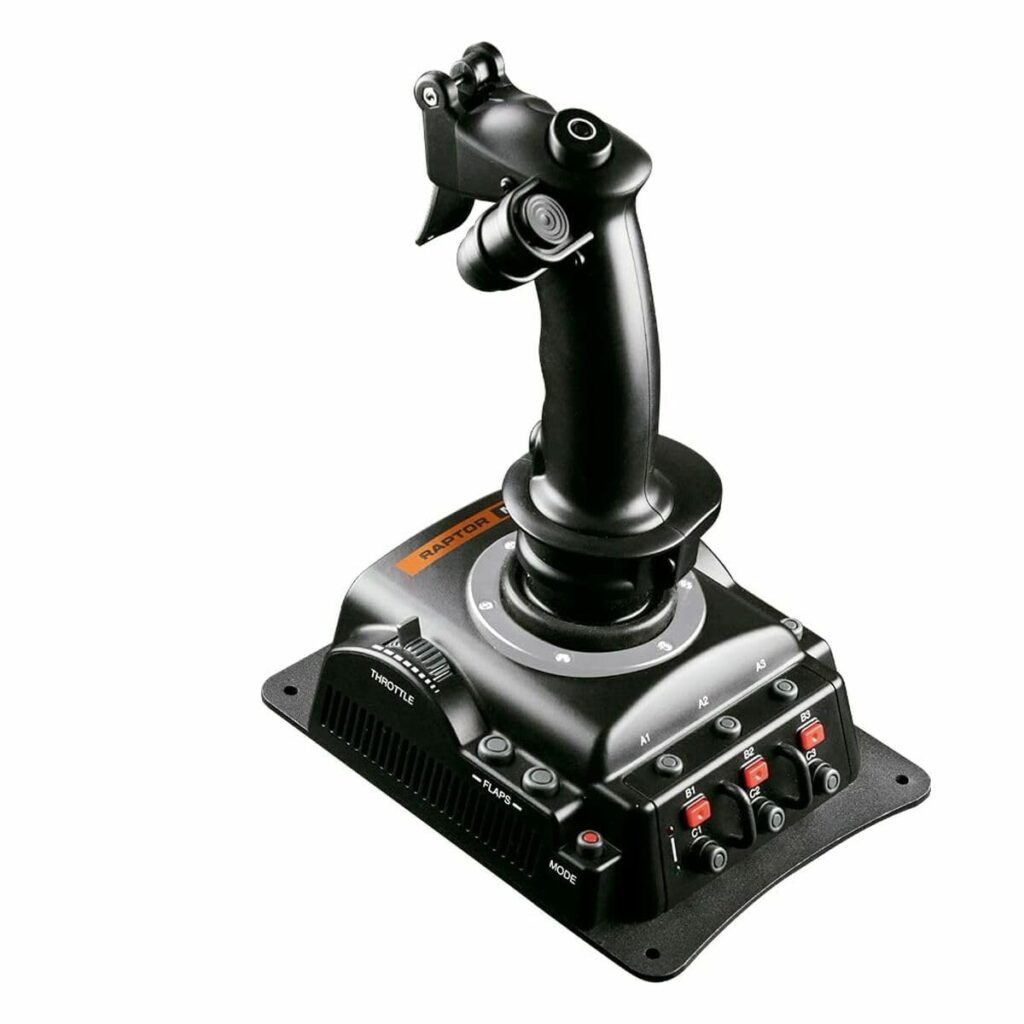
For PC users looking to get into PC flight simulators without shelling out a ton of money and having to learn complicated programming, the FR-Tec Raptor Mach 2 may be the perfect fit. The easy to use design is both ergonomic and practical for a comfortable gaming experience and precision play. The Mach 2’s base is heavy and features non-slip pads meaning no mountain necessary. The FR-Tec Raptor Mach 1 is the best option for users looking for simple and easy without compromising play capabilities.
Compatibility: Windows
Connectivity: USB
Mountable?: No
Programmable buttons?: No
Weight: 5 pounds
Special features:
- 32 action buttons with 2 hats
- Electromagnetic sensor technology
- Unique ergonomic design
How Do PC Joysticks Connect To Flight Simulator?
To set up your PC joystick on a flight simulator follow these steps:
- Connect the joystick or gamepad to an available USB port on the computer.
- Insert the CD that was included with the joystick or gamepad into the computer’s CD or DVD drive.
- Follow the wizard to install your joystick or gamepad and its associated software.
See the instructions that came with the HOTAS to install correctly.
What to Consider With HOTAS Joysticks
When choosing a HOTAS flight control peripheral, understand the actions it will be used for. Become familiar with the types of aircraft you will be simulating, if buttons should be programmable, if comfortability is key, and how much you are willing to spend.
Primary Aircraft
Depending on if you are looking to buy a HOTAS as a flight student and would like to accomplish some chair flying between flights or if you are a serious gamer looking to simulate combat, the right HOTAS for you will depend on the capabilities of that device. The more complex aircraft you plan to fly with the HOTAS the more programmable features and precision you will need.
Buttons
The buttons on a HOTAS are how you will control the aircraft you are flying. Depending on how realistic you want your HOTAS to be, picking a PC joystick that will allow you to get the look and feel of being in an aircraft is important. The more complex the aircraft you plan to fly, the more likely you will need a programmable HOTAS.
Feel
Some HOTAS are designed solely with use in mind and not with comfort. If you are a user who plans to use a HOTAS for hours a day, an ergonomic and comfortable grip should be top of mind. If you are left-handed, ensure you either invest in a left-handed or ambidextrous HOTAS.
Price
A HOTAS can be very expensive depending on the manufacturer and capabilities of the unit. To ensure you are getting the best HOTAS for your needs explore all options within the subset and choose one that fits your budget. A HOTAS can cost between $75 and $750.
Whether you are looking to buy a HOTAS because you are a professional gamer or just an aviation enthusiast, it is important to understand all the factors before purchasing. Pick a HOTAS that best fits your needs and budget.
FAQ
How Do Hands on Throttle-and-Stick (HOTAS) Connect to Your Device?
Most HOTAS attach to your PC or gaming system via a USB port.
Can I Use a HOTAS on My Computer?
Yes. As long as you have downloaded the appropriate software and games for your PC, Windows compatible HOTAS can connect to your device.
How Do I Mount My HOTAS?
Depending on which HOTAS you have purchased the mount will either be a suction mount, a screwed mount, or no mount at all. Most HOTAS can be mounted on any flat surface.
FLYING may earn revenue from the products available on this page and participate in affiliate programs.


